How to Switch to an Instagram Business Account
If you want to switch to an Instagram Business Account, the process takes less than two minutes and does not affect your existing content, followers, or account history. Everything stays exactly as it is; you simply gain access to a new set of professional tools and features designed for businesses and creators.
Switching to a business account can give you access to features such as professional insights, contact options, advertising tools, and additional account management capabilities. This guide explains how to switch to an Instagram Business Account step by step and what to expect after making the change.
What Changes When You Switch to a Business Account
When you switch from a personal account to a business account:
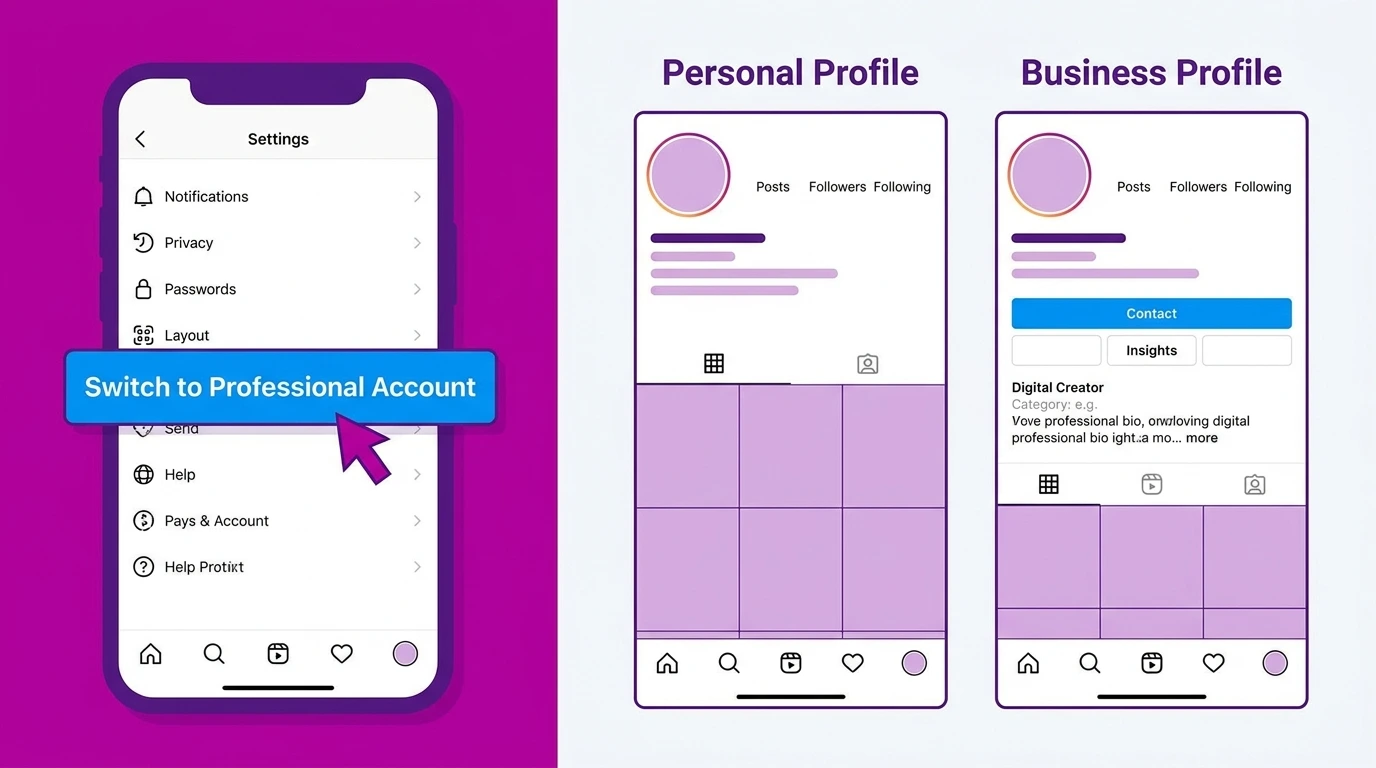
- You gain access to Instagram Insights
- A contact button appears on your profile
- You can run Instagram ads and promoted posts
- Your account connects to Meta Business Suite
- A category label appears on your profile
- Your music library changes to the commercial music library only
What does not change:
- Your username, bio, posts, followers, and following list remain intact
- Your account history is fully preserved
- You can switch back to a personal account at any time
How to Switch to a Business Account on Mobile
Steps:
- Open the Instagram app
- Go to your profile and tap the three-line menu in the top right corner
- Tap Settings and privacy
- Tap Account type and tools
- Select Switch to professional account
- Tap Continue through the information screens
- Select Business and tap Next
- Choose your business category from the list and tap Done
- Add your contact information email, phone number, and physical address if applicable
- Tap Next and complete any remaining setup steps
Your account is now a business account. Professional features are available immediately.
How to Switch to a Business Account on Desktop
Steps:
- Go to instagram.com and log in
- Click your profile picture in the top right corner
- Select Settings
- Click Account type and tools
- Select Switch to professional account
- Choose Business and follow the on-screen steps
- Select your category and add contact information
- Click Done
How to Switch from a Creator Account to a Business Account
If you currently have a creator account and want to switch to a business account, the process is the same.
- Go to Settings and privacy
- Tap Account type and tools
- Select Switch account type
- Choose Switch to business account
- Confirm the switch
How to Switch Back to a Personal Account
If you decide a business account is not right for you, switching back to a personal account is straightforward.
- Go to Settings and privacy
- Tap Account type and tools
- Select Switch account type
- Choose Switch to personal account
- Confirm the switch
Switching back removes access to business features but does not delete any content or followers.
Frequently Asked Questions
Will I lose my followers or posts when I switch to a business account?
No. Switching account type does not affect your content, followers, following list, or any other account data. Everything is preserved exactly as it was.
Can I switch to a business account and back to personal multiple times?
Yes. There is no limit on how many times you can switch between account types. However, frequent switching is not recommended, as it can disrupt your analytics data continuity.
Do I need to link a Facebook page to switch to a business account?
No. Linking a Facebook page is optional during the switch process. You can complete the switch and link a Facebook Page later through your account settings.
Why is my music library different after switching to a business account?
Business accounts have access to the Instagram Commercial Music Library rather than the full music library available to personal and creator accounts. This is due to music licensing restrictions that apply to commercial use.
Can I keep my existing username after switching to a business account?
Yes. Your username stays the same when you switch account types.
Conclusion
Switching to an Instagram business account is a quick, reversible process that gives you immediate access to professional analytics, contact features, and advertising tools. Your existing content and followers are not affected in any way.
After switching, set up your business profile completely to get the most out of your new account. For a full profile setup walkthrough, see our guide on Instagram Business Profile Setup. For a complete overview of all business account features, visit our Instagram Business Account Guide.