

Does WhatsApp Notify Screenshots? The 2026 Privacy Rules Explained
No, WhatsApp does not notify anyone when you take a screenshot, not in chats, not on Status. The one exception is View Once photos and videos: WhatsApp doesn’t notify the sender, it blocks the screenshot entirely (you get a black screen or a security-policy error). If you are facing other WhatsApp issues, the WhatsApp problems hub covers the common fixes in one place.
WhatsApp Screenshot Rules at a Glance
| Regular chat (text, photos, videos) | ❌ No | Screenshot saves normally, sender never knows |
| Status update | ❌ No | Saves normally; owner only sees you viewed it |
| View Once photo/video | ❌ No (blocked instead) | Screenshot blocked: black screen or “security policy” error |
| Profile picture | ❌ No (blocked on Android) | Blocked in full-screen view on Android |
| Video call | ❌ No | Screenshot saves normally |
Does WhatsApp Notify Screenshots of Chats?
No. WhatsApp does not send any screenshot notification for standard one-to-one or group chats. You can screenshot text messages, photos, videos, documents, and voice message waveforms freely, the other person will never know.
This is a deliberate design choice, not a missing feature. WhatsApp’s privacy model relies on end-to-end encryption for transmission security; what happens on your own screen is your business. The practical takeaway is blunt: never send anything on WhatsApp you wouldn’t want screenshotted, because there is no technical barrier stopping the other person.
Does WhatsApp Notify Screenshots of Status?
No. Screenshotting someone’s WhatsApp Status (their Story) does not trigger any notification. This surprises people coming from Instagram, where story screenshot alerts have existed in various forms.
One nuance worth knowing: the Status owner can see who viewed their status. So while there’s no screenshot alert, screenshotting a status right after viewing it leaves an obvious trail, they know you were there. If privacy matters to you as the viewer, that’s the signal to think about, not a screenshot warning.
What About View Once Photos and Videos?
This is the one case WhatsApp treats differently, and it’s the source of most confusion.
WhatsApp does not notify the sender when you attempt to screenshot View Once media. Instead, it blocks the screenshot completely. There is no “screenshot taken” alert like Snapchat sends. The block is the protection.
What you see when you try depends on your phone:
- On Android: WhatsApp uses the FLAG_SECURE window flag, which tells the OS the screen may not be captured. You typically get a system message: “Can’t take screenshot due to security policy”, and no image is saved.
- On iPhone: iOS enforces it at the system level (similar to how Netflix blocks screen capture of DRM content). Your screenshot comes out as a black or blank frame.
Screenshot blocking is only one piece of the View Once lockdown, introduced in stages since the feature launched in 2021 (blocking added in 2022). View Once media also can’t be forwarded, saved, starred, or included in backups. And critically: the block is not foolproof. Someone can always photograph the screen with a second device. View Once raises the bar; it doesn’t make capture impossible.

Can Someone Screenshot Your WhatsApp Profile Picture?
They can’t, at least not on Android, and not without you knowing via notification either. In a privacy update rolling out through late 2024 and 2025, WhatsApp removed the ability to screenshot other users’ profile pictures in full-screen view on Android, aiming to curb impersonation and harassment.
No notification is sent to the profile owner; the capture simply fails or produces a black image. On iPhone, behavior has been less consistent across versions, but the direction is clear: WhatsApp is steadily closing off screenshot capture for identity-related content.
Does WhatsApp Notify Screenshots During Video Calls?
No. You can screenshot or screen-record a WhatsApp video call and the other participants receive no alert. The same applies to voice calls (though there’s nothing visual to capture there).
If you’re on the other side of this and it bothers you, the honest answer is that no setting in WhatsApp prevents it. Your protection is social, not technical: know who you’re calling.
WhatsApp vs Snapchat vs Instagram: Who Actually Notifies?
The confusion exists because every app handles this differently. Here’s the honest comparison:
| ❌ No, except View Once/profile pics are blocked, not notified | |
| Snapchat | ✅ Yes: sender is notified of screenshots and screen recordings |
| ⚠️ Partial, notifies for Vanish Mode and disappearing DMs; regular stories/posts, no | |
| Telegram | ⚠️ Partial, notifies only in Secret Chats |
The pattern: apps built around ephemeral content (Snapchat) notify; WhatsApp, built around permanent encrypted chats, generally doesn’t, it blocks capture only where it promised ephemerality (View Once).
How to Protect Your Privacy on WhatsApp
Since WhatsApp won’t warn you about screenshots, protect yourself with the tools it does give you:
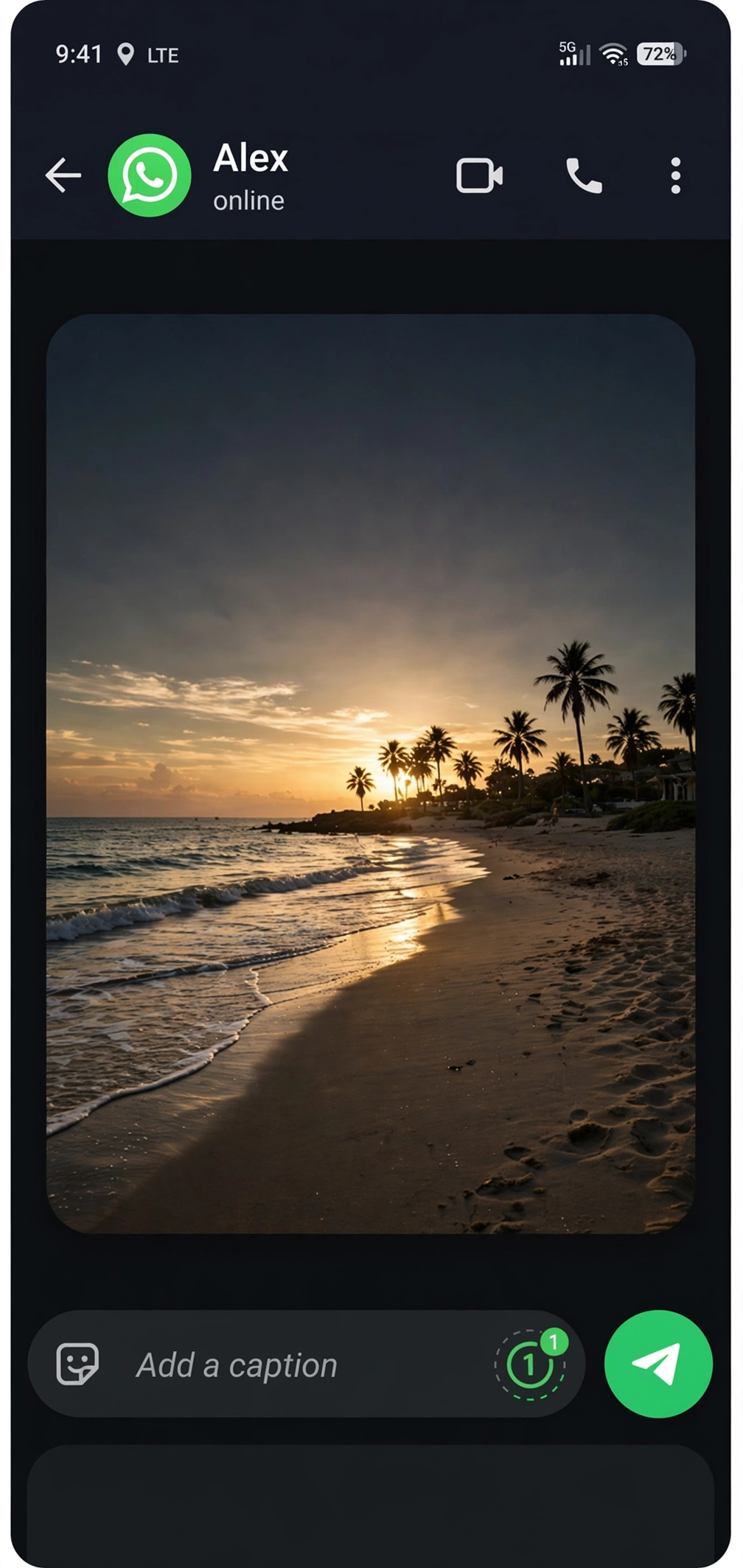
- Use View Once for sensitive photos and videos. It’s the only media type with screenshot blocking. Send it via the “1” icon in the caption bar before hitting send.
- Turn on disappearing messages for sensitive chats (24 hours, 7 days, or 90 days: chat → contact name → Disappearing messages). This doesn’t stop screenshots, but it shrinks the window of exposure.
- Lock WhatsApp with biometrics (Settings → Privacy → Fingerprint/Face ID lock) so nobody screenshots your chats from your unlocked phone.
- Audit your profile photo privacy (Settings → Privacy → Profile photo → “My contacts” or “Nobody”), especially now that screenshot blocking exists, limiting who sees it is still the stronger control.
- Assume every chat can be screenshotted. The golden rule: if you wouldn’t want it shared, don’t send it, no app setting overrides human behavior.

Frequently Asked Questions
Does WhatsApp notify when you screenshot a chat?
No. WhatsApp has no screenshot notification for regular one-to-one or group chats, on either Android or iPhone.
Can someone tell if I screenshot their WhatsApp Status?
No, there’s no screenshot alert for Status. They can only see that you viewed it.
Does WhatsApp notify screenshots of View Once photos?
No, and this is the key distinction: WhatsApp doesn’t notify, it blocks. You’ll get a black screen (iPhone) or a security-policy error (Android), and the sender is never told you tried.
Why can’t I screenshot a WhatsApp profile picture?
WhatsApp blocks profile-picture screenshots on Android (rolling out since late 2024) to prevent impersonation. No notification is sent; the capture just fails.
Does WhatsApp notify screen recording?
No. Screen recording a chat, Status, or video call triggers no alert. (View Once media can’t be screen-recorded either, the recording comes out black.)
How do I stop someone from screenshotting my WhatsApp messages?
You can’t, for regular chats, no setting prevents it. Use View Once for sensitive media, disappearing messages to limit exposure, and be selective about what you send.
Does WhatsApp tell you if someone screenshots a disappearing message?
Disappearing messages (24h/7d/90d timers) are not the same as View Once, screenshots of disappearing messages are not blocked and trigger no notification.
The Bottom Line
WhatsApp does not notify screenshots, it blocks them, but only where it promised ephemerality. Regular chats and Status: screenshot freely, no alert. View Once and profile pictures: capture is blocked, still no alert. If you take one rule from this guide, make it this: WhatsApp protects messages in transit with encryption; what happens on someone else’s screen is outside its control, and outside yours.
Looking for more app fixes? Browse every guide in Social Media App Fixes, or head back to AppIssueFix Home.




10 Comments